Every rival subscription tracker starts by asking for your bank login. Catchly refuses to — it watches sign-ups, renewals and price hikes on 24 services you already use, keeps the whole list on your device, and warns you before the card gets charged. No bank connection. No account. Nothing leaves your browser.
See the live siteCatchly is a Chrome extension that spots your recurring charges the moment you sign up, keeps that list on your own device, and warns you before every renewal, free-trial conversion, and price hike — without a bank login or an account.
The subscriptions costing you the most are the ones you've forgotten. The obvious fix — an app that reads your bank feed — means handing a startup your banking credentials and paying it a cut of your "savings." Catchly takes the opposite bet: it never touches your bank. It watches only the 24 subscription sites you already visit, notices when you sign up or hit a renewal page, and does all of the tracking, reminding and math locally in your browser. Nothing about your subscriptions is ever uploaded anywhere.
Every popular subscription tracker works the same way: connect it to your bank through a data aggregator, let it read every transaction, and let it charge you — often 30–60% of the money it "saves" you. That model is powerful, but it asks you to trust a third party with the keys to your entire financial life, and it quietly reads every purchase you make, not just the subscriptions.
That teardown is the research. I went through the popular trackers, and the pattern was unanimous: every one starts by asking for a bank connection and takes a cut. There was no privacy-first option on the shelf. That gap, not a feature wish, is the decision the whole product is built on: refuse the bank entirely and see how much value survives. Most of it does.
Catchly's bet is that most of the value comes without any of that risk. It never sees your bank. Instead it watches only a narrow, fixed list of 24 subscription sites — the streaming, AI, productivity, news, design and storage services people actually pay for — and detects the subscription right where it happens: at the sign-up or renewal page. The tracking, the reminders and the spend math all run on your device. This isn't a privacy footnote; it is the product.
Each one is a specific moment where money slips away silently. Catchly's job is to make that moment visible before the charge lands — in plain language, with a way to act on it.
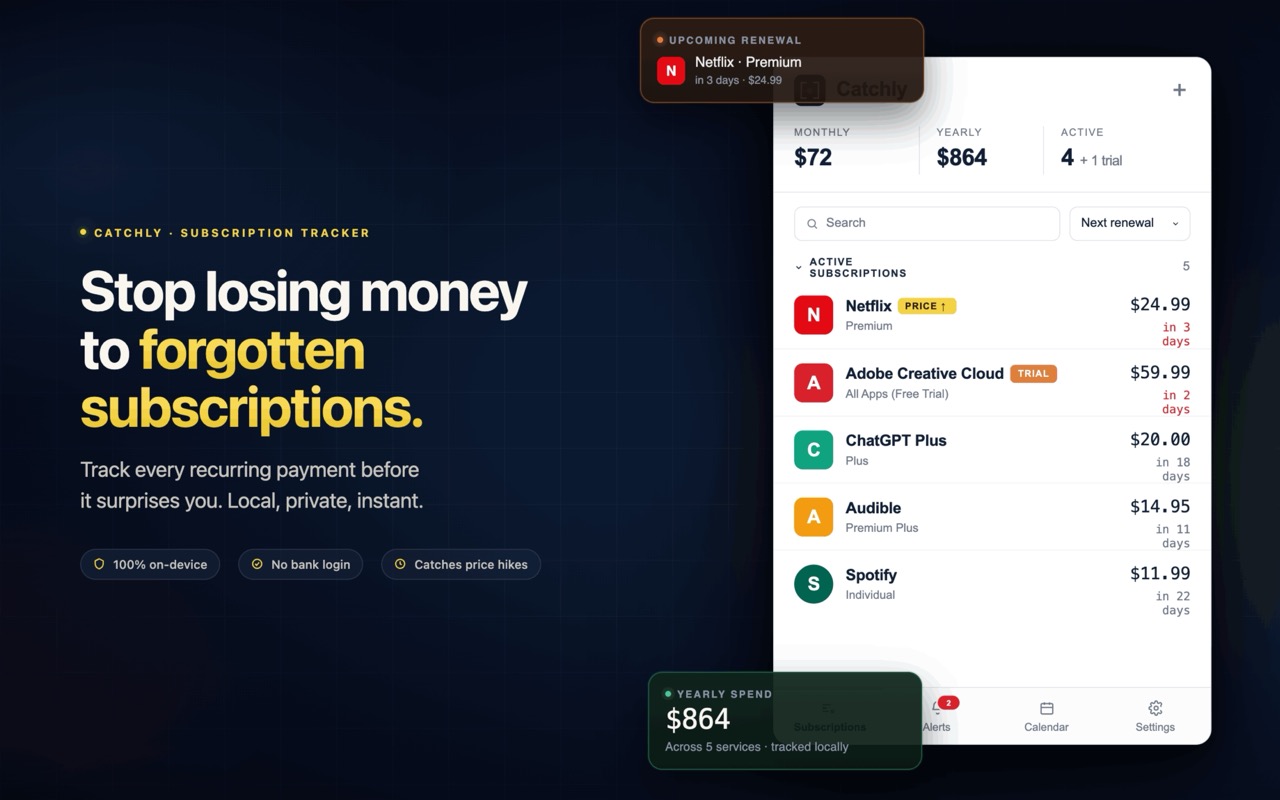
Land on a checkout or sign-up page for a supported service and an in-page toast slides in offering to track it. No copying, no manual entry.
Chrome notifications 1, 3, or 7 days ahead (your choice). The one before the charge, not the statement after it.
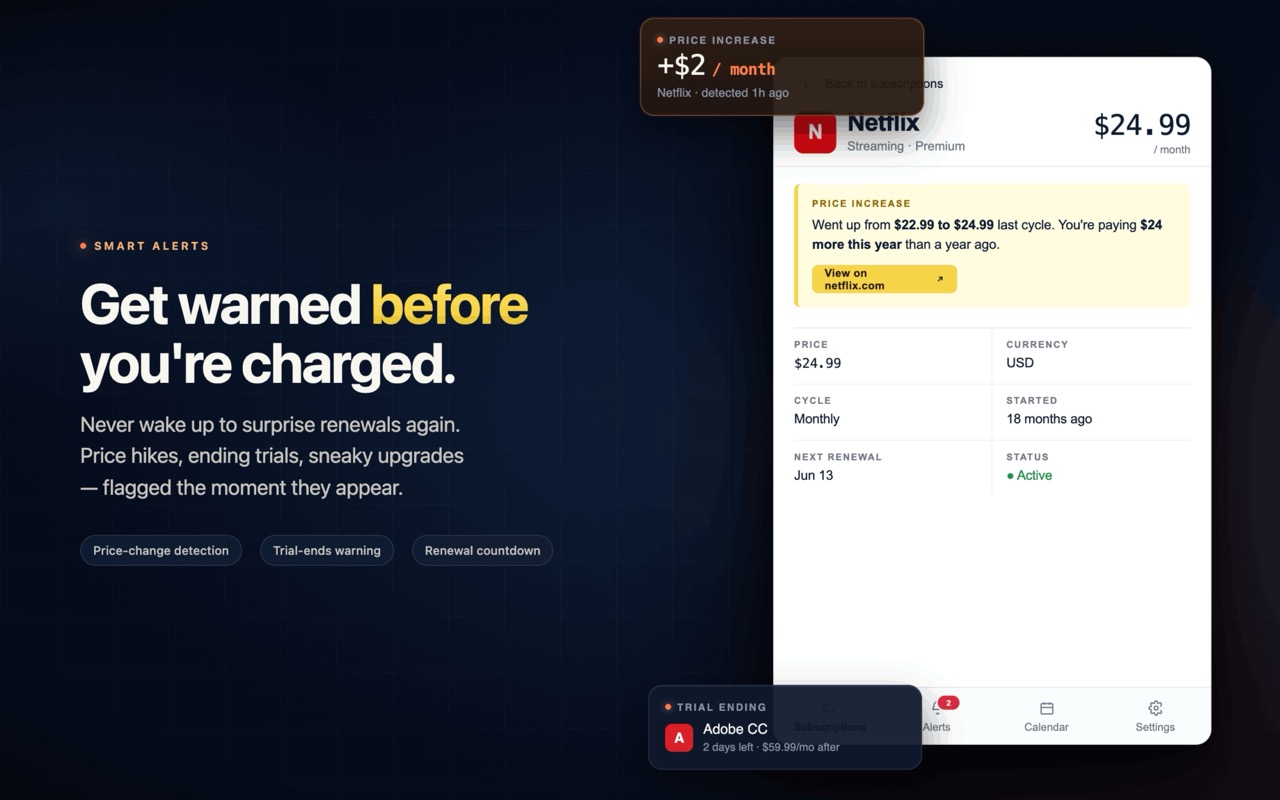
The most expensive kind of forgetting — a "free" trial quietly turning into a paid plan — gets its own countdown alert.
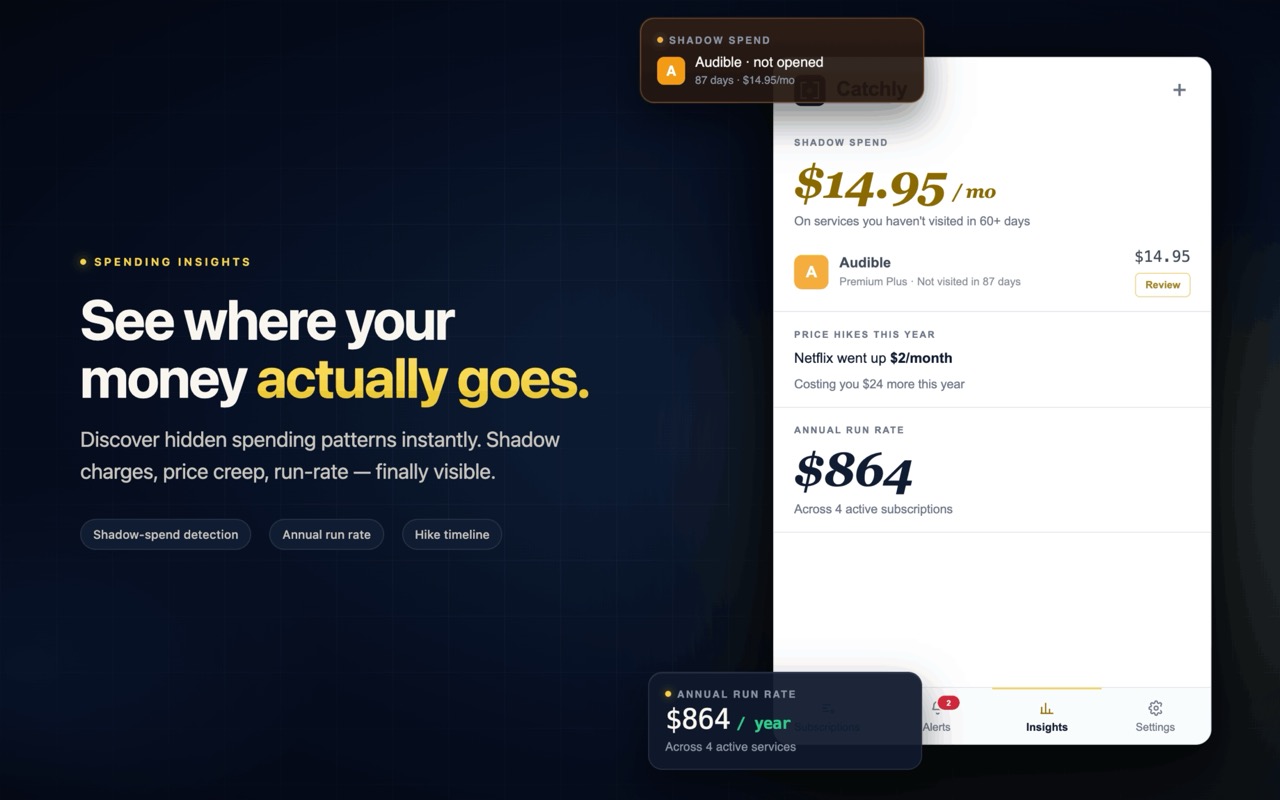
When a renewal page shows a higher price than last time, Catchly surfaces the change (e.g. Netflix $22.99 → $24.99) instead of letting it slide by.
Haven't opened a service in 30+ days but it's still billing you? A local usage sweep flags it — the classic "still paying for Audible" case.
"Cancel this" deep-links straight to the service's cancellation page and lists the dark-pattern steps in plain English — honest guidance, not fake automation.
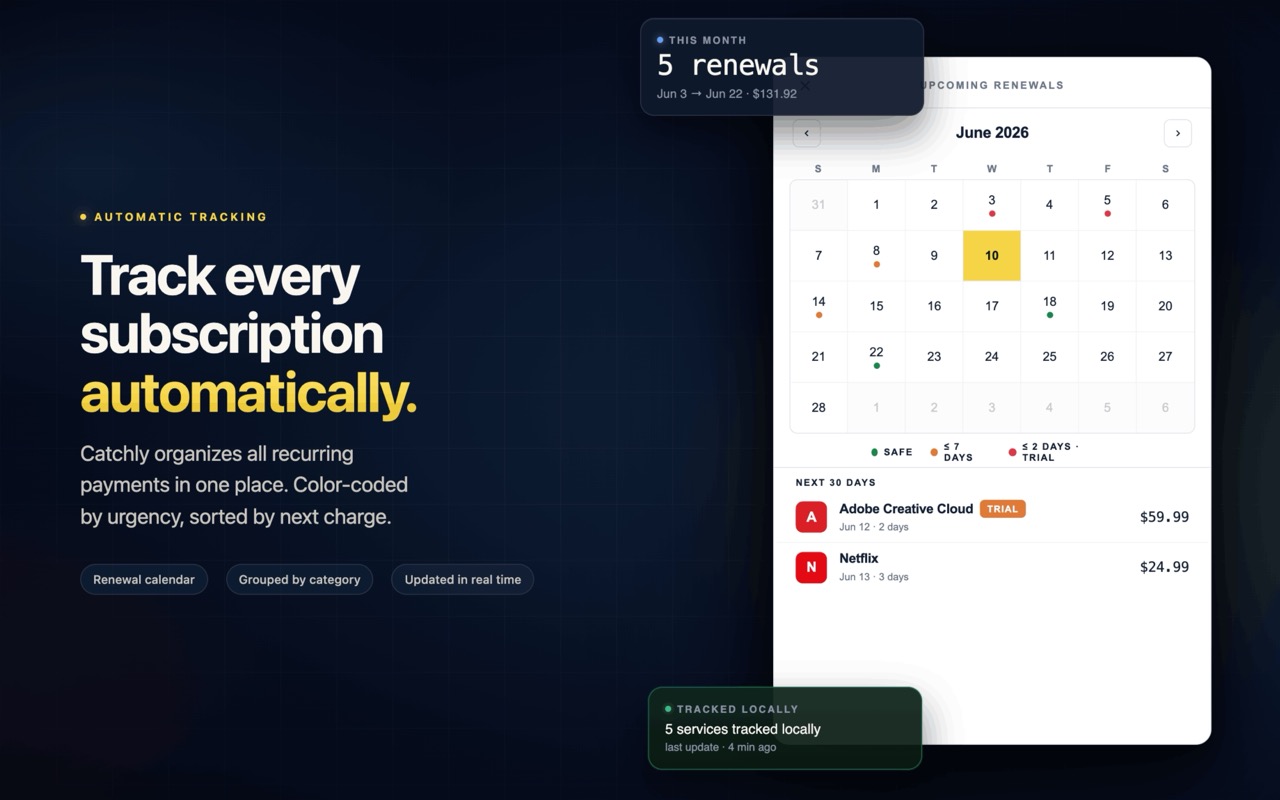
A renewal calendar with day-by-day dots so the next month is never a surprise, plus a rolling "next 30 days" list.
A spend summary that stays honest with mixed currencies — USD, EUR, GBP, CAD, AUD, JPY and INR totals are kept separate, never mashed together.
Pin the toolbar icon and its badge counts down to your most urgent renewal, colour-coded safe → soon → urgent → overdue.
There's no server in the loop. A small script runs only on the 24 allowlisted sites, spots a subscription, and hands it to a background worker that stores it on your device and schedules the reminders. Here's the whole path, start to finish:
Say netflix.com/signup or spotify.com/premium. A content script — allowed to run only on the 24 listed domains — reads the page.
It matches the site against a local service catalogue (lib/merchants.js) that knows the brand, typical price, billing cycle and real cancel URL — then slides in an in-page toast offering to track it.
The subscription is written to chrome.storage.local — your browser, your device. Never chrome.storage.sync, never a server. Can't auto-detect a service? Add any name manually in about ten seconds.
A service worker schedules Chrome alarms for each renewal, runs a daily shadow-charge sweep, and updates the toolbar badge — all offline, all on-device.
Local Chrome notifications fire before renewals and trial conversions. Open the popup to see the dashboard, the calendar, the price-hike alerts, and a one-click link to cancel.
Catchly asks for the minimum it needs and nothing more. There is no <all_urls> — the browser itself blocks it from running anywhere outside the allowlist. Here's exactly what each permission is for:
Saves your subscription list, settings and usage history to your device.
local onlySchedules the renewal, trial and shadow-charge reminders for a future time.
no server timersShows the desktop reminders — generated locally, never from a remote payload.
on-deviceOpens the cancel page, and notices when you visit a known service (for shadow charges).
matched locally
Both a bank-linked tracker and Catchly want to answer "what am I paying for?" The difference is where your data goes to get the answer. On the left, the model everyone else uses; on the right, Catchly's:
// 1. Hand over your bank credentials aggregator.link(bankUsername, bankPassword); // 2. Every transaction is read & uploaded const all = await server.fetchTransactions(); // …groceries, rent, everything — not // just your subscriptions // 3. Data lives on their servers cloud.store(all); // synced, mineable // 4. They bill you a cut of "savings" subscription.charge(0.4 * saved);
// 1. No login. Nothing to hand over. // Runs only on 24 allowlisted sites. // 2. Detects the sub at the source const sub = detectOnPage(location.host); // 3. Saved on YOUR device — never synced await chrome.storage.local.set({ sub }); // no chrome.storage.sync, no backend // 4. Free, forever. Zero outbound calls // during normal use. notifications.local(renewalSoon);
The trade-off, stated honestly: because Catchly never reads your bank, it only knows about services it can see you use in the browser — that's why the supported list is explicit and grows over time. In exchange, you never share a banking credential, your subscription list never leaves your device, and there's no percentage-of-savings fee. That's the deal, and it's the point.
The same on-device approach powers every screen in the popup. These are the real listing shots:


Anyone can build a subscription list. The decisions that make Catchly trustworthy were mostly about what to not do — and being honest about the limits. Four real ones:
No framework, no build-time magic to hide behind — plain modules that a reviewer can read top to bottom. Every file has one job:
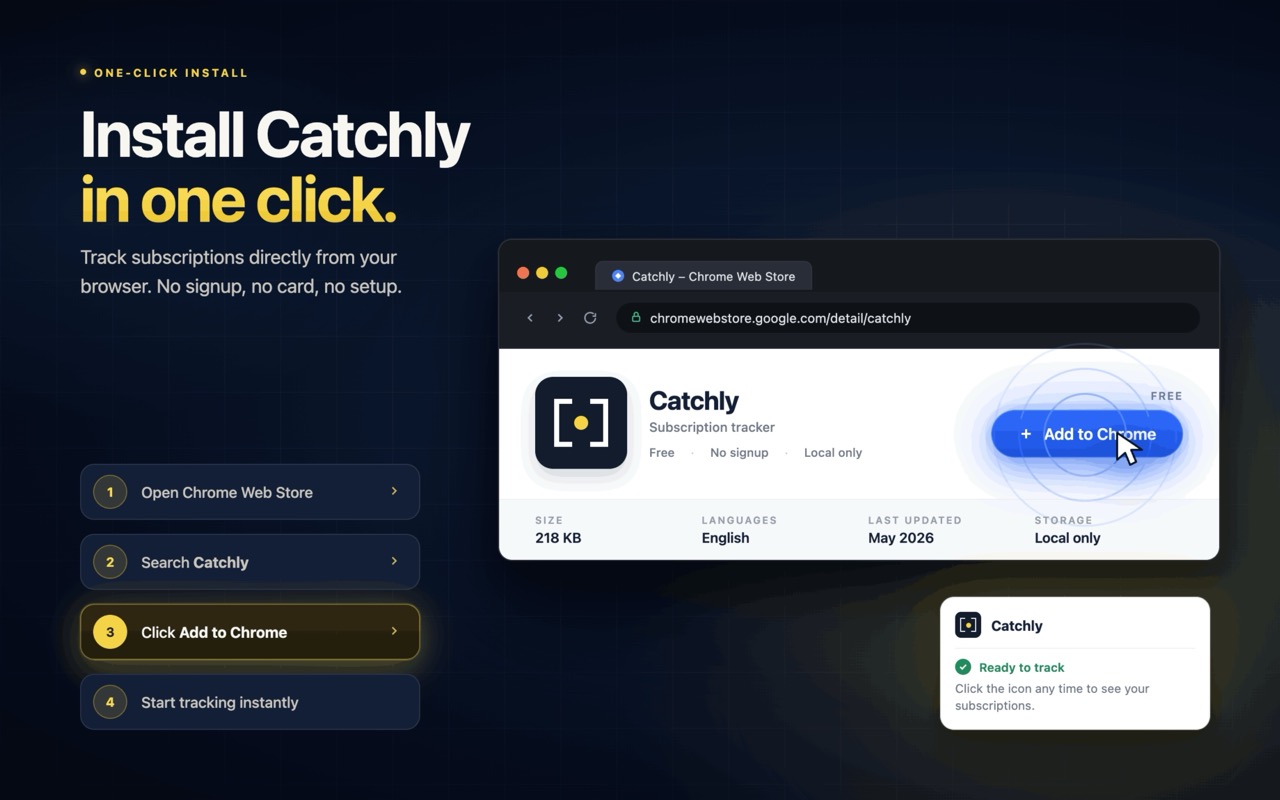
No login, no account, no setup. The fastest way to see everything working:
# 1. Open chrome://extensions, enable Developer mode, # click "Load unpacked" and pick this folder. # 2. Click the Catchly icon → 3-screen onboarding plays. # 3. Settings → "Load sample data" for a 2-second tour # (includes a Netflix price hike + an Audible shadow charge). # 4. Visit a supported site to see live detection: netflix.com/signup # the in-page toast slides in
Catchly v0.1.0 is submitted to the Chrome Web Store with a live preview on getcatchly.com. Everything in the feature list is working code, not placeholder — the smoke suite exercises the critical paths on every run, and because the whole thing is source-available under MIT, every privacy claim can be checked line by line.
Auto-detect, reminders, price-hike & shadow-charge alerts, calendar, insights, guided cancel, import/export, four themes — real code, not stubs.
No analytics SDK, crash reporter, telemetry beacon or usage ping. Zero outbound calls in normal use; one optional, disclosed waitlist call.
A hand-curated catalogue across streaming, AI, productivity, news, design & storage — each new entry takes about five minutes to add.
The obvious build is the one every rival ships: connect to the bank through an aggregator, read every transaction, take a cut of the "savings." I followed that path to its end and killed it — it means holding someone's financial keys and reading purchases that have nothing to do with subscriptions. Refusing it is the product, but I'm honest that it costs real coverage: Catchly only sees the 24 sites on its allowlist, so a subscription bought somewhere off-list is invisible. I took a smaller, honest scope over a broader, creepier one.
What I'd do differently: I hand-curated the 24-domain allowlist, which doesn't scale — every new service is a code change by me. I'd invest earlier in a community-editable detection-rule format so coverage can grow without me in the loop.