CASE STUDY Founding Product Designer · Legal Tech SaaS

CaseNotes: AI meeting notetaker built for lawyers, not meetings.

Where every conversation is part of a case, and every record carries the weight of privilege.

Muzeeb Urrahaman Founding Product Designer Legal Tech SaaS Pre-Launch · 0→1 System Privilege-Safe Matter Memory
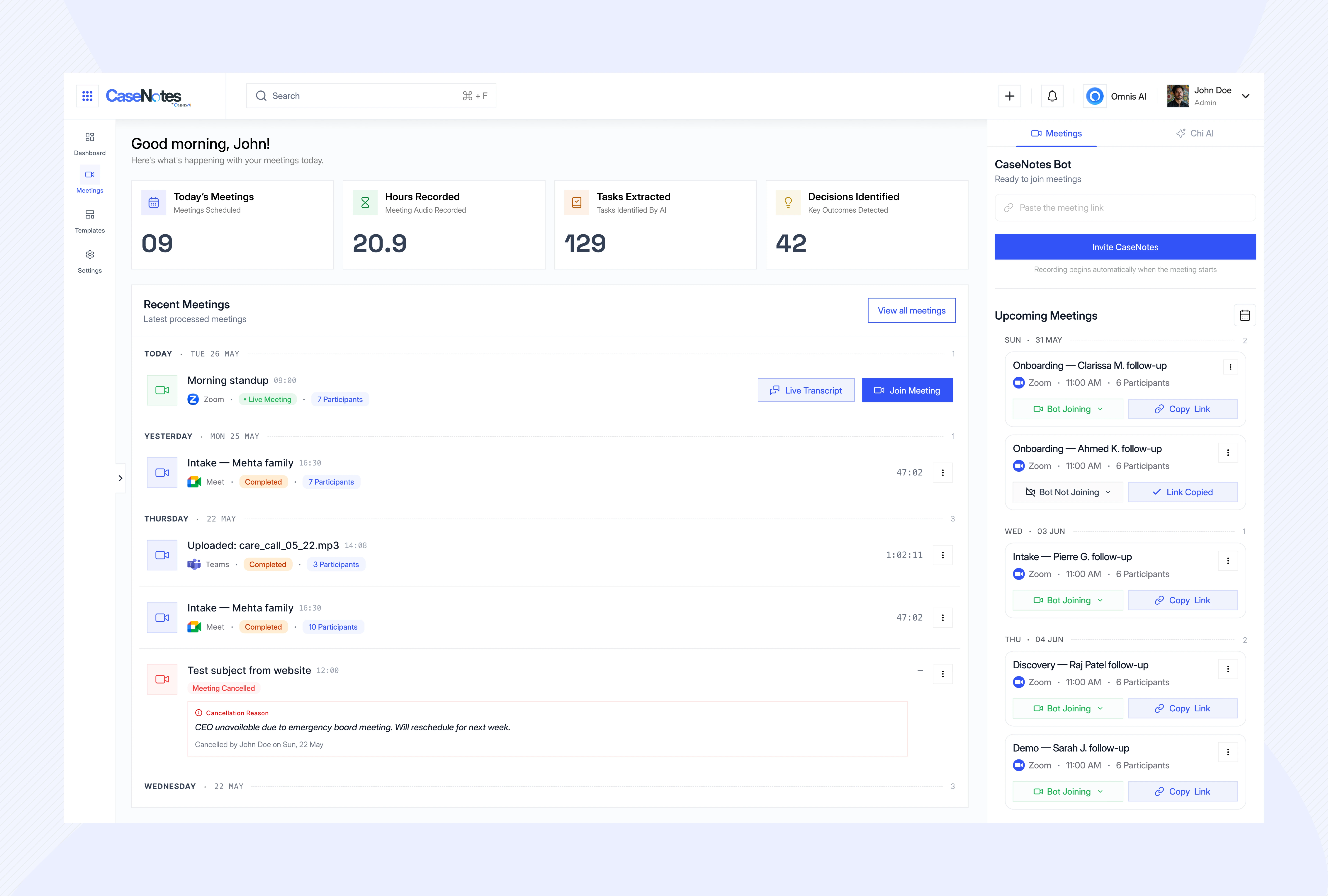
CaseNotes: AI Meeting Notetaker for Lawyers cover preview
Role
Founding Product Designer (0-to-1)
Domain
Legal Tech SaaS · Matter Intelligence
Core Constraint
Privilege Preserved at Capture
Outcome
Cross-Matter Memory & 4 Scoped Views

CaseNotes is an AI meeting notetaker built specifically for lawyers who cannot treat sensitive client consultations like sales calls.

Designed around privilege, not just transcription. Every client conversation may become part of a case file, subject to discovery, privilege review, and bar association conduct rules. CaseNotes treats "can this record exist, and who can see it" as a core design constraint, not a buried settings toggle.

Built as matter memory, not an isolated meeting log. Summaries attach directly to active cases. Decisions, court deadlines, and privilege flags connect across the matter's lifecycle, routing straight to assignees without paralegals manually re-entering notes into practice management software.

The Opening Insight In 9 of the 12 client meetings shadowed during discovery, associates paused or stopped recordings the moment discussions turned toward settlement numbers or strategy, and scrambled afterward to reconstruct that part from memory. That is a structural flaw in general-purpose AI tools.

Every AI notetaker treats a meeting as a meeting. In law, a meeting is evidence.

Higher-accuracy transcription models do not solve the core failure modes of legal note-taking:

Scattered Matter Records

  • Case notes live scattered across practice management, document storage, calendars, and external notetakers.
  • Paralegals re-type identical notes, billing logs, and task lists across multiple tools after every call.
  • Critical details get lost or mistyped during manual copy-pasting between systems.

Privilege Waiver Risk

  • In United States v. Heppner, courts established that consumer AI platforms lack the fiduciary relationship required to preserve attorney-client privilege.
  • Passing client strategy through generic notetakers can waive privilege during discovery.
  • Lawyers are forced to choose between efficiency and malpractice exposure.

Zero Cross-Meeting Memory

  • General tools treat each meeting as an isolated file with no awareness of the overarching matter.
  • Nothing connects a settlement discussion in March to deposition preparation in October.
  • Case context is lost when associates rotate off files or leave the firm.
Legal Precedent United States v. Heppner, as highlighted by Mayer Brown: uncontrolled consumer AI transcription creates discoverable liabilities in litigation.

Auditing 12 tools: 3 out of 4 failure modes were legal risks, not UX complaints

General tools compete on raw transcription speed and automated email summaries. In legal practice, that ignores confidentiality requirements, privilege logs, and ethical walls.

Fireflies.ai

  • No privilege controls: every word captured is discoverable by default in litigation.
  • Intrusive meeting bot creates social friction and awkward moments on client calls.
  • No matter linkage: summaries live siloed in Fireflies rather than the active case file.
  • Consumer-grade data handling not aligned with bar rules of professional conduct.

Otter.ai

  • Same consumer-AI privilege exposure, with no fiduciary relationship under federal rules.
  • Past class-action lawsuits over recording consent practices erode client trust.
  • Arbitrary meeting length caps right at deposition prep durations.
  • Zero practice management or document management integration.

Fathom

  • Bot presence remains visible on calls despite marketing claims, creating exposure.
  • Lacks SOC 2 / ISO compliance configurations needed for legal-grade confidentiality.
  • Steep pricing jump from free to paid with no tier scaled for boutique law firms.
  • No concept of matters, case files, or privilege tiers across client interactions.

Lua Legal-Specific Competitor

  • Direct legal competitor with SOC 2, ISO 27001, GDPR, and off-the-record controls.
  • Strong on real-time assistance and administrative time entries for billing.
  • Thinner on cross-matter memory: treats meetings as standalone records rather than connected timeline nodes.
  • Lacks role-tuned views: partners, associates, paralegals, and clients all receive the same interface.
A meeting that needs a 14,000-word transcript to be useful wasn't a meeting. In a law firm, it's also a discovery liability waiting to happen.

Shadowing lawyers before drawing a screen: discovery on real legal constraints

I observed 12 live client meetings and case conferences across four small-to-midsize firms, conducted 7 follow-up interviews with partners, associates, and paralegals, and audited published AI notetaker guidance from Mayer Brown, Cahill, and the American Bar Association (ABA).

1. Ad-Hoc Pauses

Associates used personal, undocumented rules to pause recorders during settlement talks, creating firm-wide inconsistency.

2. Paralegal Tax

Paralegals spent hours re-typing identical meeting notes into practice management software, document drives, and billing logs.

3. Meeting Boundaries

Lawyers treat internal team huddles and privileged client sessions differently, but standard tools handle both identically.

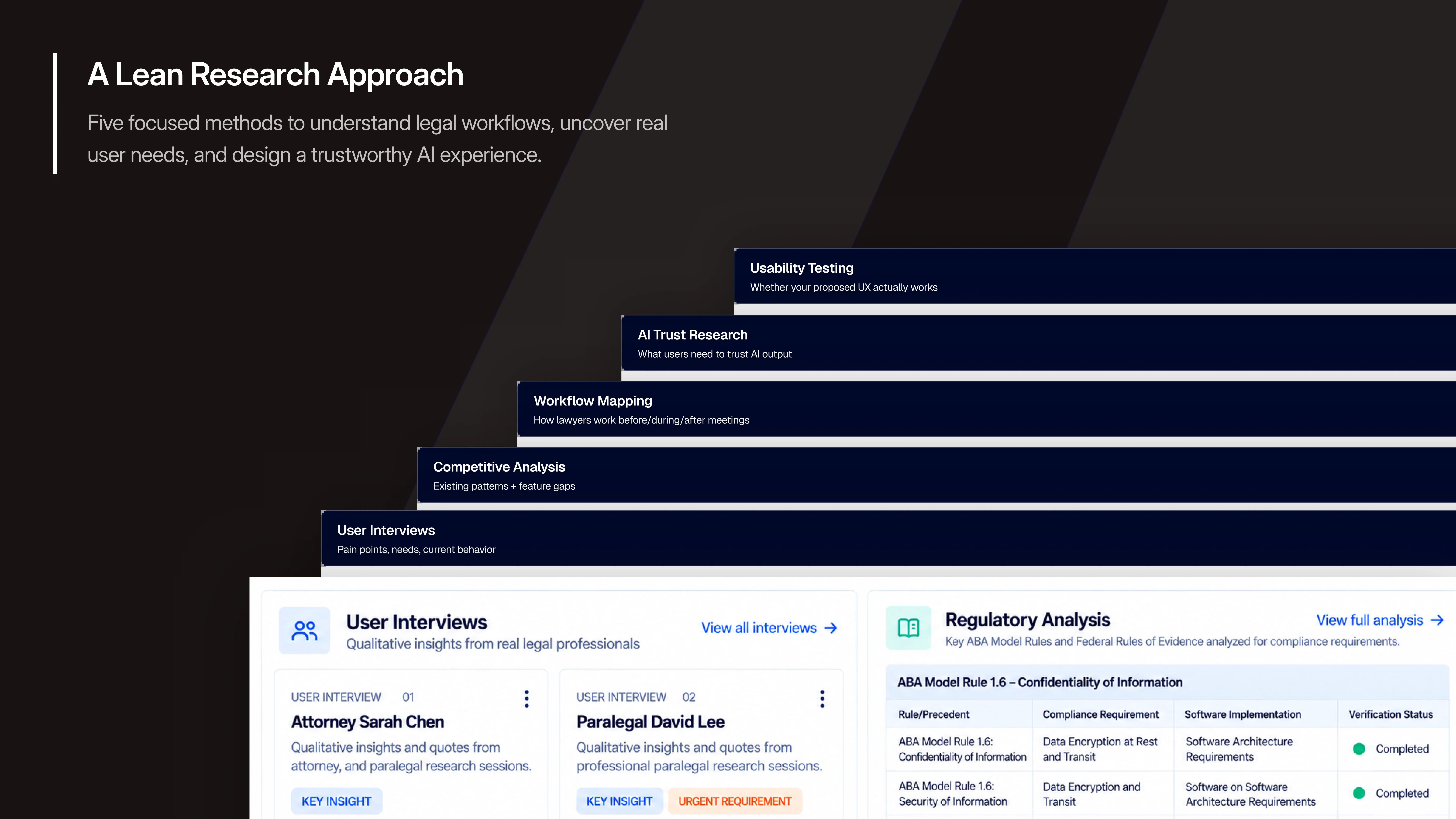
Research Artifact
Interview Synthesis & Regulatory Mapping

Synthesis across 12 live client sessions and 7 attorney interviews, translating ABA ethics opinions and discovery precedents into product requirements.

The Design Thesis

Principle 1: The lawyer controls whether a record exists in real time. A one-tap shortcut pauses capture mid-sentence and marks the segment privileged, going off the record without breaking conversational flow.

Principle 2: Every output is linked to a matter. Summaries attach directly to the case record, carry privilege tags, and stay restricted behind firm ethical walls.

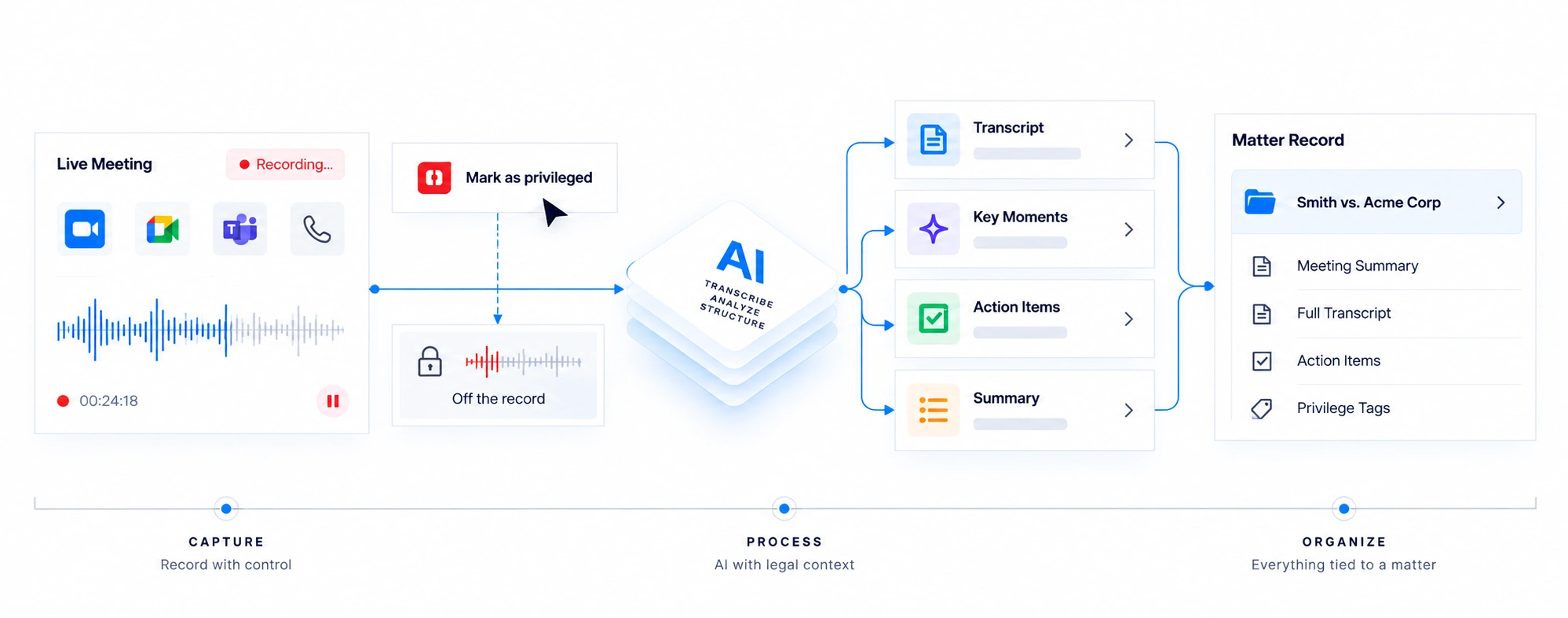
Live meeting audio stream streams Capture gate pause · mark privileged one keystroke, live confirmed Structured summary filed to Matter file Partner decisions, risk, billing Associate action items, deadlines Paralegal filings, doc requests Client / GC privilege-stripped digest role-scoped view
The two core principles: real-time capture gate control (left) feeding structured intelligence that branches into role-scoped views (right).

One meeting, four moments: deciding if a record should exist at all

01. Matter tagging
02. Live meeting
03. Privilege review
04. Matter file
05. Case routing
06. Follow-up

1. Before: Tag the matter, inherit its defaults

CaseNotes links with firm calendars and practice management software. Before a meeting begins, it checks the matter assignment and applies inherited privilege defaults (litigation calls default to privileged and restricted; firm administrative meetings default to open).

Setup Flow
Calendar Integration & Matter-Tagging Sequence

Calendar matching, case selection, and automatic privilege profile inheritance.

2. During: Minimal ambient UI & one-keystroke control

During calls, CaseNotes stays ambient: no bot avatars or scrolling transcript text. A discreet indicator shows recording status, and a single shortcut pauses capture for sensitive discussions.

In-Meeting UI
Ambient Recording & Privilege Pause Toast

Minimalist status indicator alongside a 'Recording paused (marked privileged)' notification.

3. After: Structured intelligence, filed where it belongs

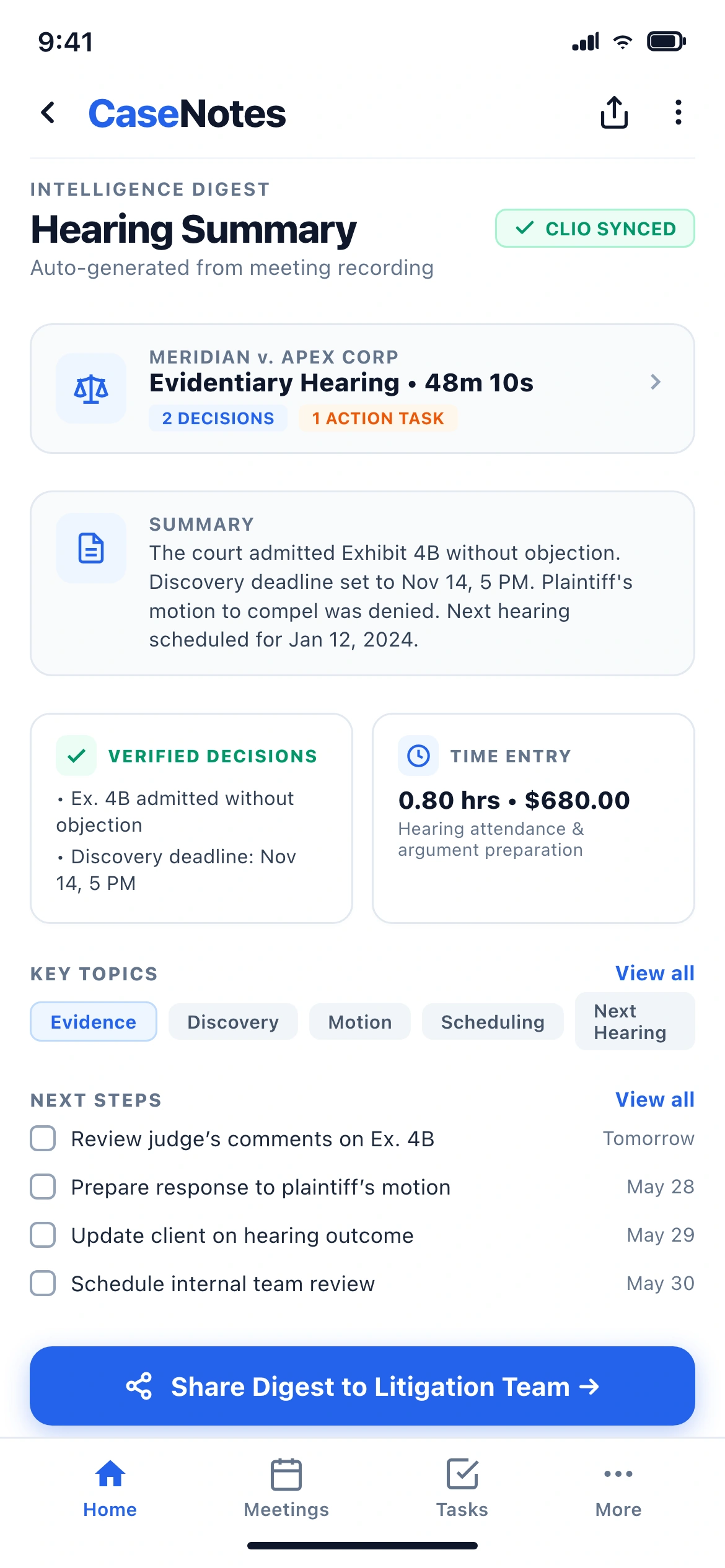
Post-meeting summaries file directly to the case: context, decisions, assignees, deadlines, and segment-by-segment privilege tags. Raw transcripts remain in a secondary drawer to minimize discovery exposure.

Hero Surface
Post-Meeting Structured Summary View

Matter header, decisions, action items, segment-by-segment privilege toggles, and transcript drawer.

The transcript is evidence. The summary is intelligence. In a law firm, shipping the transcript by default isn't just a UX miss; it creates a wider surface for a privilege fight.

How AI turns 47 minutes into 5 matter-linked artifacts

Privilege detection and structured artifact extraction run in parallel across the meeting audio stream:

1
Audio → Diarized Transcript

Voice prints identify recurring participants. Unrecognized speakers are checked against the firm's conflict database to flag potential ethical breaches.

Conflict Check
2
Transcript → Topic Segmentation

The dialogue is split into logical topic blocks based on subject shifts rather than arbitrary minute intervals (~8 semantic blocks for a typical 45-minute session).

Semantic Chunking
3
Segments → Decisions, Actions & Privilege Suggestions

Settlement numbers and strategy points become Decisions. Commitments turn into Action Items with owners and dates. Work product phrasing is flagged for lawyer confirmation.

Automated Extraction
4
Segments → Key Moments

Consensus shifts and critical witness statements receive exact audio timestamps for rapid verification.

10s Audio Scrubbing
5
Assembly → Case Filing

Structured outputs bundle into the standardized case record and sync to practice tools under role-specific permission rules.

Single Model Call per Meeting
Audio raw meeting diarize Transcript speaker-labeled segment Topic segments ~8 per 47-min call extract Decisions & action items flag (suggest) Privilege flags lawyer confirms/overrides Structured summary
Decisions and action items are extracted in parallel with privilege detection, merging into a unified matter file.
Interaction Model
Privilege Confirmation & Override Flow

How attorneys verify or override suggested privilege tags with one click, ensuring defensible audit trails.

Cross-matter memory: connecting discussions across the life of a case

Individual meeting notes expire in days. Cross-meeting case memory compounds over months of litigation:

Matter Timeline

Tracks how theories and settlement parameters evolve across multiple client and opposing counsel sessions.

Billable Follow-up Tracker

Drafts billable time entries matched to UTBMS activity codes alongside task checklists.

Privilege & Decision Log

Maintains an exportable registry of decisions tagged by privilege tier for discovery production.

Conflict Ledger

Audits attendee rosters against ongoing firm conflict checks to prevent inadvertent ethical walls breaches.

Team Coverage Insights

Monitors associate and paralegal case allocation to balance courtroom preparation workloads.

Deadline Gap Alerts

Flags commitments tied to statutory court filing deadlines that remain unassigned or incomplete.

Case Intelligence
Conflict, Attendance & Coverage Dashboard

Overview of matter health, participant conflict logs, and court filing schedules across litigation teams.

Syncing where the case already lives: Clio, NetDocuments, and client portals

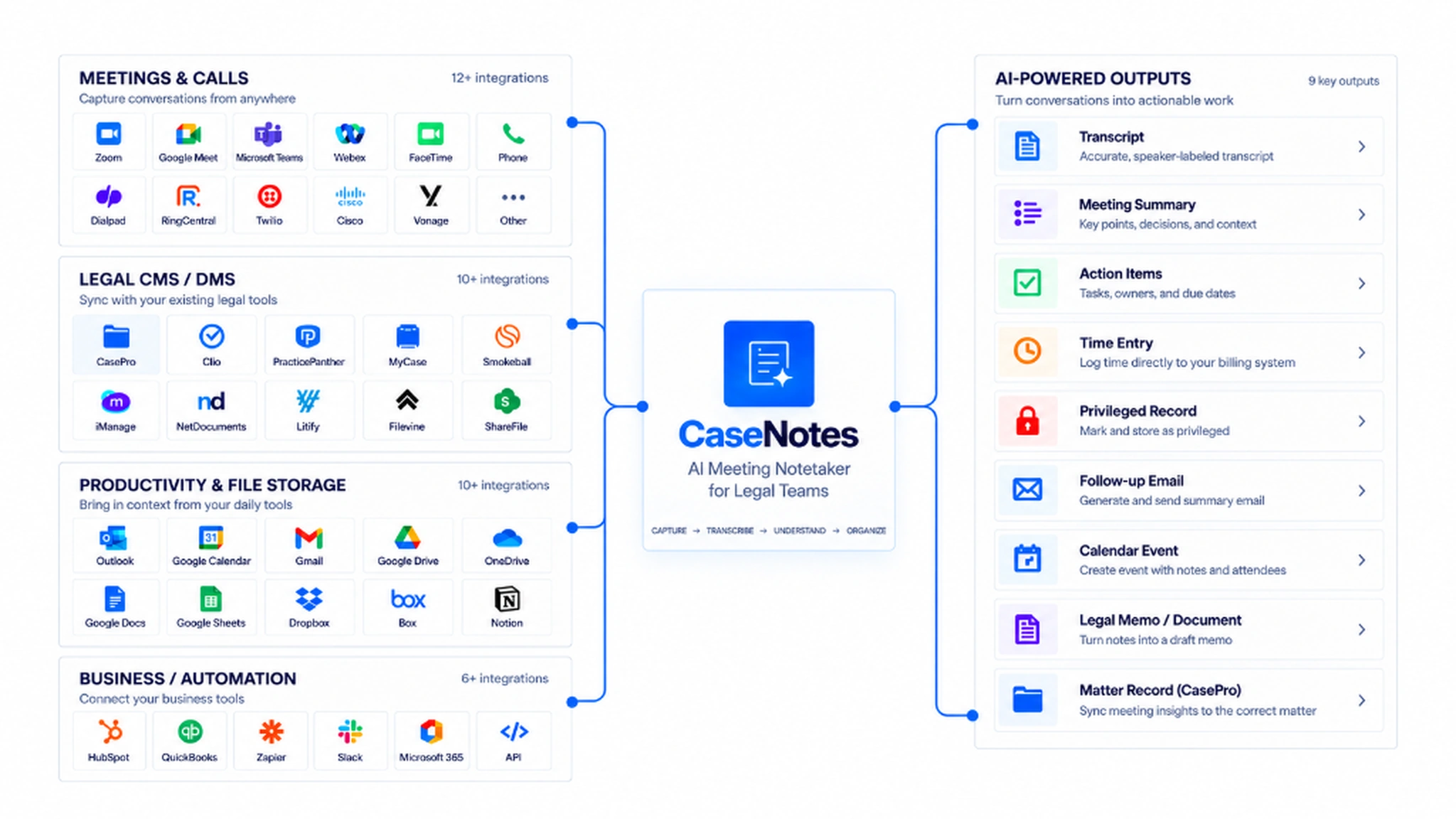
CaseNotes avoids standalone silos by syncing structured data directly into core legal software:

Matter summary structured output billing time + task filed documents court deadlines Practice management Clio · MyCase · PracticePanther Document management NetDocuments · iManage Case calendar filing deadlines redacted summary Strip privileged ethical-wall filter Client portal plain-language digest
Direct synchronization with legal practice suites, while external client views route through an automated privilege-stripping filter.

Same matter, four roles: tailored for legal ethics and responsibilities

Partner View

Focuses on strategic decisions, exposure risk, billable time capture, and staffing.

Associate View

Prioritizes research tasks, motion drafting deadlines, and timestamped source citations.

Paralegal View

Tracks court filing dates, document requests, witness schedules, and docket items.

Client & In-House Portal Clients receive plain-language digests. Internal attorney work product, settlement strategy notes, and privileged discussions are stripped at the API layer before display.
Permission Scoping
Role-Based Interface Comparison Grid

Side-by-side comparison showing how the exact same meeting record dynamically adapts for Partners, Associates, Paralegals, and Clients.

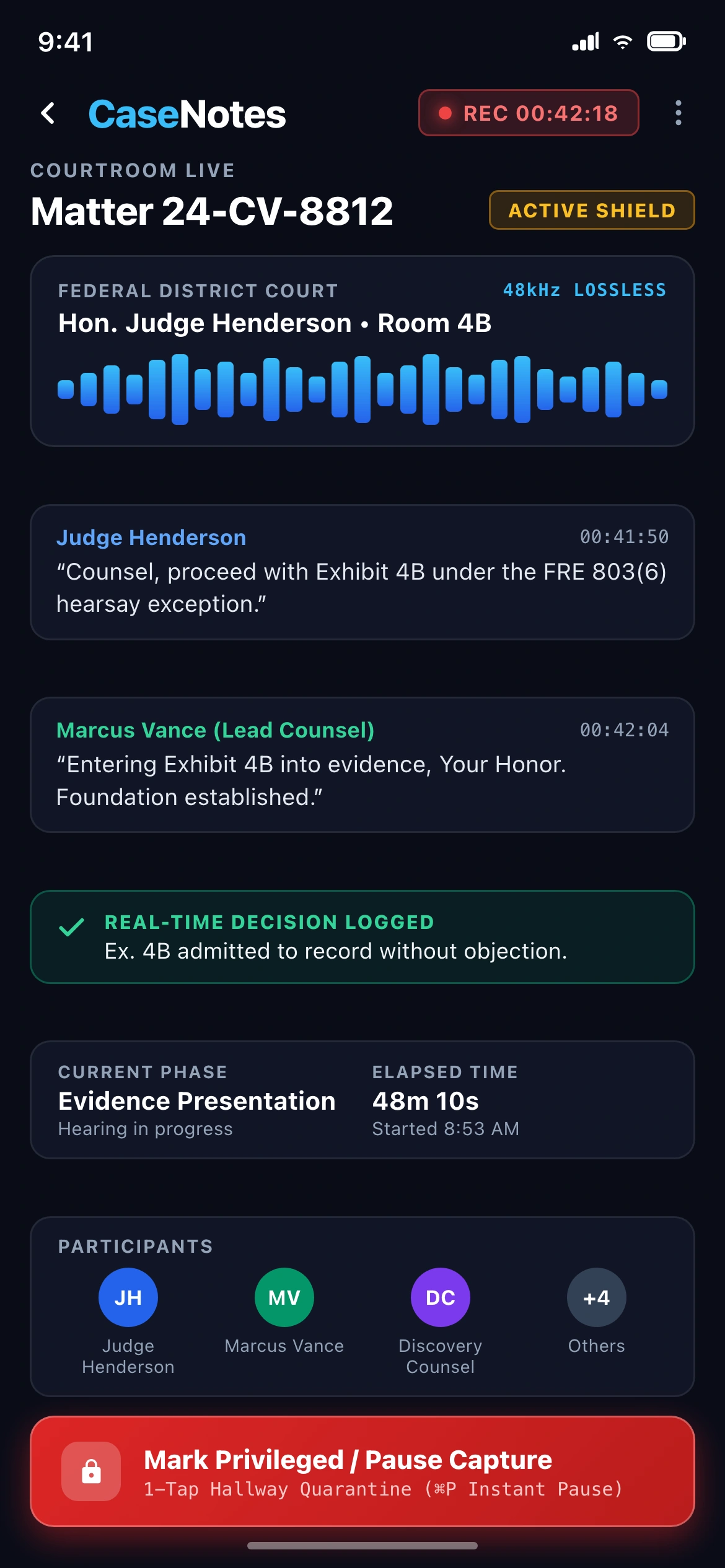
Designed for the courthouse hallway: fast, secure mobile access

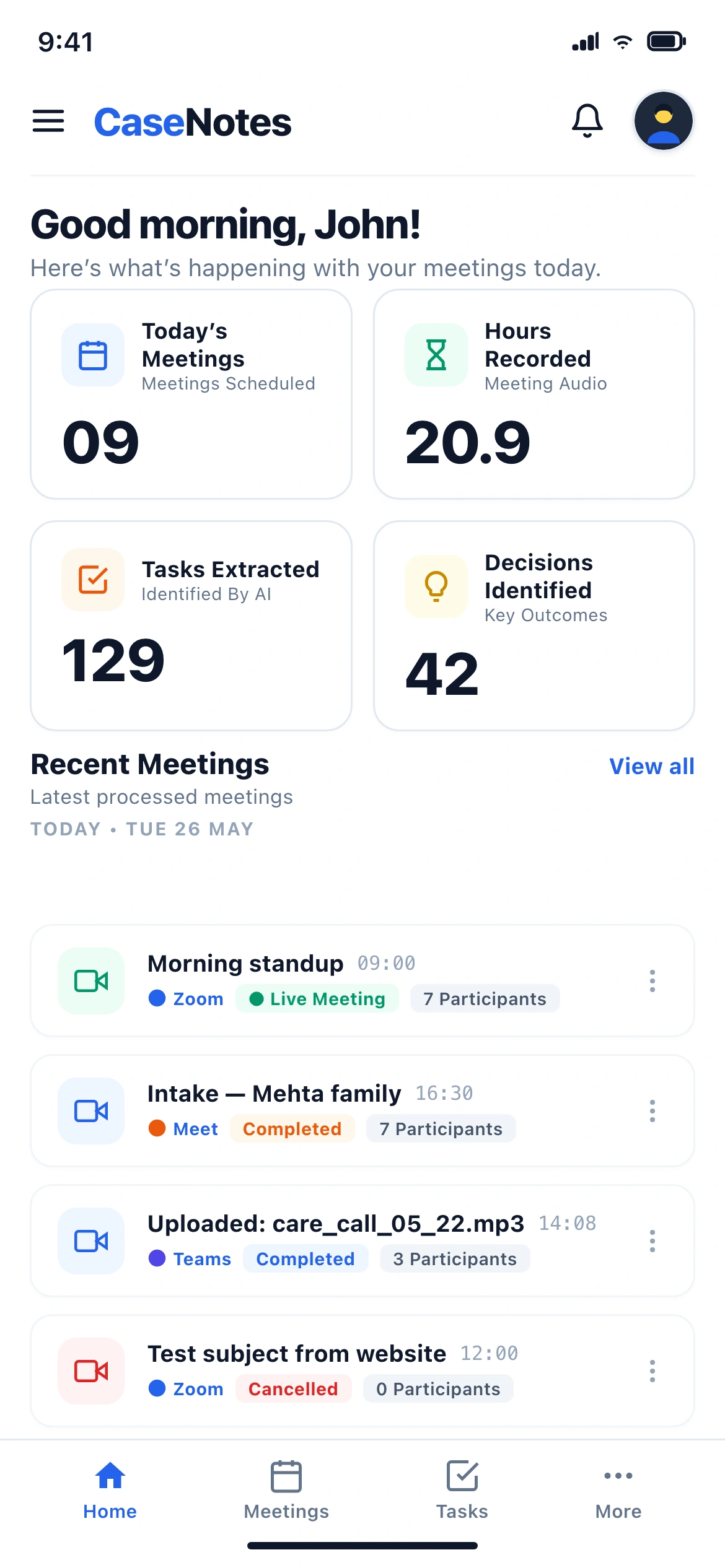
Lawyers frequently need quick answers between court sessions. Mobile trims out full transcripts in favor of 30-second briefings, task checkoffs, and masked privileged records.

30-Second Hallway Brief

Chronological timeline of case commitments and outstanding filings tailored for review before stepping into chambers.

Scoped Matter Search

Search queries isolate to active cases, preventing ethical-wall leaks and returning structured decision cards instead of raw text.

Design System Framework

Dual-theme architecture (dark mode for dense case-team workspaces, warm light mode for client portals) with strict token hygiene.

Mobile & Design System
Mobile Viewports & Component Token Architecture

Key mobile screens (Hallway Briefing, Timeline, Search) and Figma design system components showing density-aware variants.

Prototype validation with legal teams

94%
Task completion rate
(finding matter privilege status)
88%
Stated they would trust it
on privileged client calls
86/100
Usability SUS Score
across partner & associate testers
45 min
Saved per matter weekly
in note re-entry and billing prep

Key Design Decisions

Systems Over Screens

Designed an interconnected matter-linked architecture rather than generic transcription screens, supporting multi-role legal workflows.

Compliance-Led Design

Integrated ethical walls, privilege logs, and discovery defensibility into the core product rather than treating compliance as an afterthought.

Role-Specific Scoping

Created structural boundaries for four distinct user tiers, ensuring sensitive work product is never exposed to unauthorized recipients.

Most AI products treat compliance as a checkbox after design is done. In law, compliance is a design input from the first screen. Get the wrong default here and the product doesn't have a rough edge; it has a liability.
NEXT CASE STUDY

OmnisProof: Self-Serve Legal E-Signatures

Collapsing a 4-step wizard into one guided, AI-assisted setup page for legal teams.

// MINIMAP ENGINE (function() { var mmSections = [ ["overview", "Overview"], ["problem", "The Friction"], ["competition", "Competitive Audit"], ["research", "Research & Thesis"], ["lifecycle", "Meeting Lifecycle"], ["pipeline", "AI Pipeline"], ["intelligence", "Matter Intelligence"], ["integration", "Workflow Integration"], ["roles", "Role-Based Views"], ["mobile-ia", "Mobile Experience"], ["metrics", "Results & Impact"] ]; var rail = document.getElementById("mmRail"); if (!rail) return; var mmActive = null; mmSections.forEach(function(s, i) { var item = document.createElement("div"); item.className = "mm-item"; var btn = document.createElement("button"); btn.className = "mm-bar" + (i === 0 ? " active" : ""); btn.setAttribute("type", "button"); btn.setAttribute("aria-label", "Go to " + s[1]); btn.addEventListener("click", function() { document.getElementById(s[0]).scrollIntoView({ behavior: "smooth", block: "start" }); }); item.addEventListener("mouseenter", function() { var tip = document.createElement("div"); tip.className = "mm-tip"; tip.innerHTML = '' + String(i + 1).padStart(2, "0") + '' + s[1] + ''; item.appendChild(tip); }); item.addEventListener("mouseleave", function() { var tip = item.querySelector(".mm-tip"); if (tip) tip.remove(); }); item.appendChild(btn); rail.appendChild(item); }); var mmBars = [].slice.call(document.querySelectorAll(".mm-bar")); function mmUpdate() { var marker = window.innerHeight * 0.32; var closest = null, dist = Infinity; mmSections.forEach(function(s) { var el = document.getElementById(s[0]); if (!el) return; var r = el.getBoundingClientRect(); var d = Math.abs(r.top - marker); if (r.bottom > 80 && d < dist) { closest = s[0]; dist = d; } }); if (closest && closest !== mmActive) { mmActive = closest; mmBars.forEach(function(b, i) { b.classList.toggle("active", mmSections[i][0] === mmActive); }); } } window.addEventListener("scroll", mmUpdate, { passive: true }); window.addEventListener("resize", mmUpdate); mmUpdate(); })(); // LIGHTBOX (function() { var lightbox = document.getElementById("lightbox"); var lbImg = document.getElementById("lightboxImg"); var lbCaption = document.getElementById("lightboxCaption"); var lbClose = document.getElementById("lightboxClose"); var lbPrev = document.getElementById("lightboxPrev"); var lbNext = document.getElementById("lightboxNext"); var allImages = Array.from(document.querySelectorAll(".figure img, .hero-cover img")); var currentIndex = 0; var lastFocused = null; function renderImage(idx) { if (idx < 0) idx = allImages.length - 1; if (idx >= allImages.length) idx = 0; currentIndex = idx; var img = allImages[currentIndex]; lbImg.src = img.currentSrc || img.src; lbImg.alt = img.alt || ""; var caption = img.closest("figure, .hero-cover"); var captionEl = caption ? caption.querySelector("figcaption") : null; lbCaption.textContent = captionEl ? captionEl.textContent : (img.alt || ""); } function openLightbox(img) { lastFocused = document.activeElement; currentIndex = allImages.indexOf(img); if (currentIndex === -1) currentIndex = 0; renderImage(currentIndex); lightbox.classList.add("open"); document.body.style.overflow = "hidden"; lbClose.focus(); } function closeLightbox() { lightbox.classList.remove("open"); document.body.style.overflow = ""; if (lastFocused) lastFocused.focus(); } allImages.forEach(function(img) { img.addEventListener("click", function() { openLightbox(img); }); }); if (lbPrev) { lbPrev.addEventListener("click", function(e) { e.stopPropagation(); renderImage(currentIndex - 1); }); } if (lbNext) { lbNext.addEventListener("click", function(e) { e.stopPropagation(); renderImage(currentIndex + 1); }); } lightbox.addEventListener("click", function(e) { if (e.target === lightbox || e.target === lbImg) closeLightbox(); }); lbClose.addEventListener("click", closeLightbox); document.addEventListener("keydown", function(e) { if (!lightbox.classList.contains("open")) return; if (e.key === "Escape") closeLightbox(); else if (e.key === "ArrowLeft") renderImage(currentIndex - 1); else if (e.key === "ArrowRight") renderImage(currentIndex + 1); }); })();